
Birthdays and work anniversaries are easy to care about and surprisingly easy to miss. One lands on a busy Monday, another on a Saturday, and the “happy belated 🎂” arrives two days late. Today we’re fixing that where your team already talks: PeopleWisher is now in Slack.
In short: add PeopleWisher to your Slack workspace in one click, pick a channel, and every birthday, work anniversary and holiday is celebrated there automatically, on the day. Each person can get their own post, or everyone celebrating that day can be grouped into one message.
What PeopleWisher does in Slack
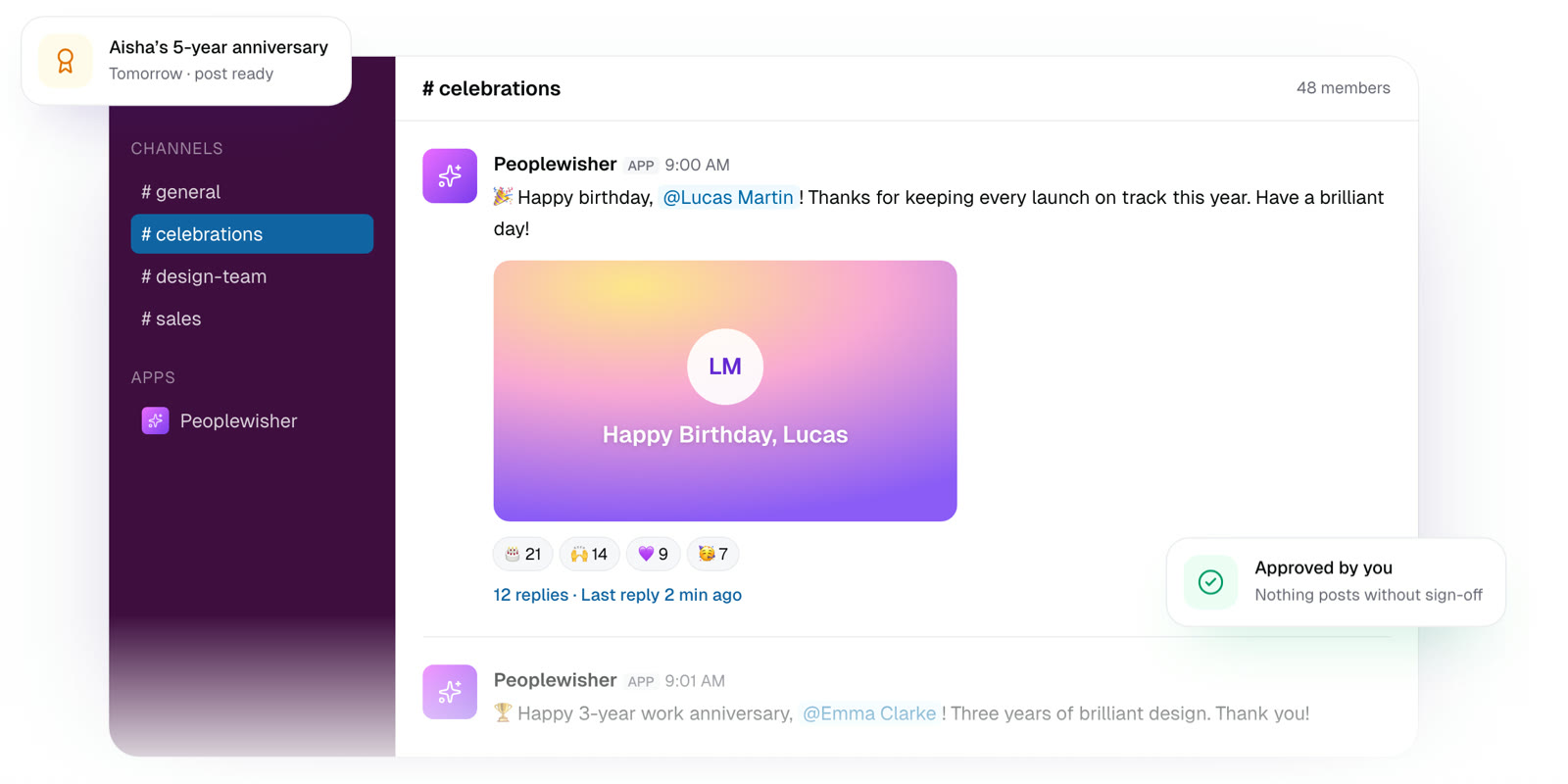
- Celebrates automatically, on the day. Birthdays, work anniversaries and holidays are posted at the time you choose, in your workspace’s time zone. No calendar reminders, no spreadsheet.
- Posts in the channel you pick. #general, #celebrations or a team channel. Each group can post to a different channel.
- @mentions the celebrant. Teammates see who it is and can react or reply in the thread.
- Writes the message for you. Use one template for everyone with each person’s name filled in, or let PeopleWisher AI write a personal message for each person before their day.
- Adds a celebration card. Attach a branded card with the person’s name and photo, or post text only.
- Posts as the app or as a teammate. Send as the PeopleWisher app, or from a connected team member such as your HR lead, so it feels personal.
- Keeps you in control. Review each post before it goes out, or let every celebration post itself.
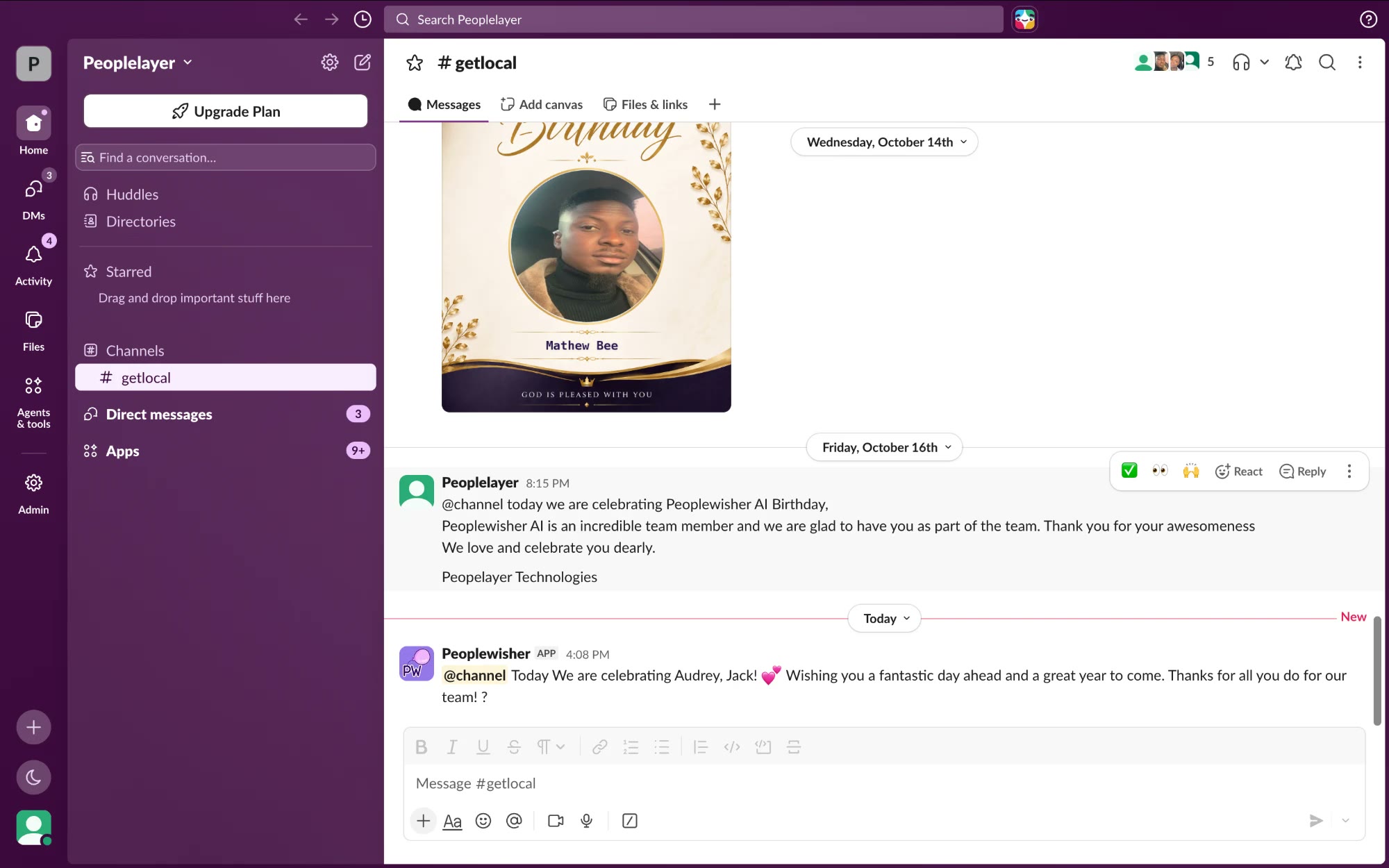
One post per person, or everyone together
Some teams want every celebrant to have their own moment. Others have busy channels and prefer one tidy post a day. PeopleWisher for Slack supports both:
- One post per person: each birthday or anniversary gets its own dedicated message.
- One daily roundup: turn on Combine Multiple Celebrants and everyone celebrating on the same day is grouped into a single post, for example “Today we are celebrating Audrey and Jack! 🎉”.

How to set up PeopleWisher for Slack
Setup takes a few minutes, and after that it runs every year on its own.
1. Add PeopleWisher to Slack
Go to peoplewisher.com/slack and click Add to Slack. Approve the app for your workspace. If you’re new to PeopleWisher, you can start free.
2. Add your team’s dates
Bring in your people and their birthdays and work anniversaries. You can sync your HR system, import a CSV, or share a branded celebration form so teammates add their own dates.
3. Turn on Slack for a group
In PeopleWisher, open People, pick the group you want to celebrate (for example Staff), and open its Default Scheduler. Switch on Slack.

4. Choose how it posts
- Message: pick Same message for everyone (one template, each person’s name filled in) or A special message for each person (written by AI before their day). Use Write with AI to draft your template.
- Send message as: the PeopleWisher app, or a connected team member.
- Slack channel: choose the channel from the list. Click Refresh channel list if a new channel doesn’t show yet.
- Combine Multiple Celebrants: turn it on to group everyone celebrating at the same time into one message.
5. That’s it
PeopleWisher checks dates every day and posts on the day. Your team gets the message, the card and the @mention, and nobody has to remember a thing.
Frequently asked questions
Can PeopleWisher post birthdays in Slack automatically?
Yes. Once Slack is switched on for a group, PeopleWisher posts each birthday, work anniversary and holiday in your chosen channel on the day, at the time you set.
Can I group several birthdays into one Slack message?
Yes. Turn on Combine Multiple Celebrants and everyone celebrating on the same day is grouped into a single post.
Who appears as the sender in Slack?
Either the PeopleWisher app or a connected team member, such as someone from your People team. You choose per group.
Do I have to approve every post?
It’s up to you. You can review each message before it goes out, or let celebrations post themselves.
Ready to celebrate your team in Slack?
Add PeopleWisher to your workspace and the next birthday on your team will be celebrated on time, in the right channel, without anyone keeping a spreadsheet.
Put this on autopilot with Peoplewisher
Import your people once. Peoplewisher remembers every date, writes the message, designs the card and sends it on the right channel.