If HR is currently tracking birthdays and work anniversaries in a spreadsheet, a shared calendar, or “whoever remembers,” you already know where this breaks: it works fine at 15 people and quietly falls apart at 50. This guide walks through how to move that process onto genuine automation — the kind that sends messages on its own, not just reminds a human to.
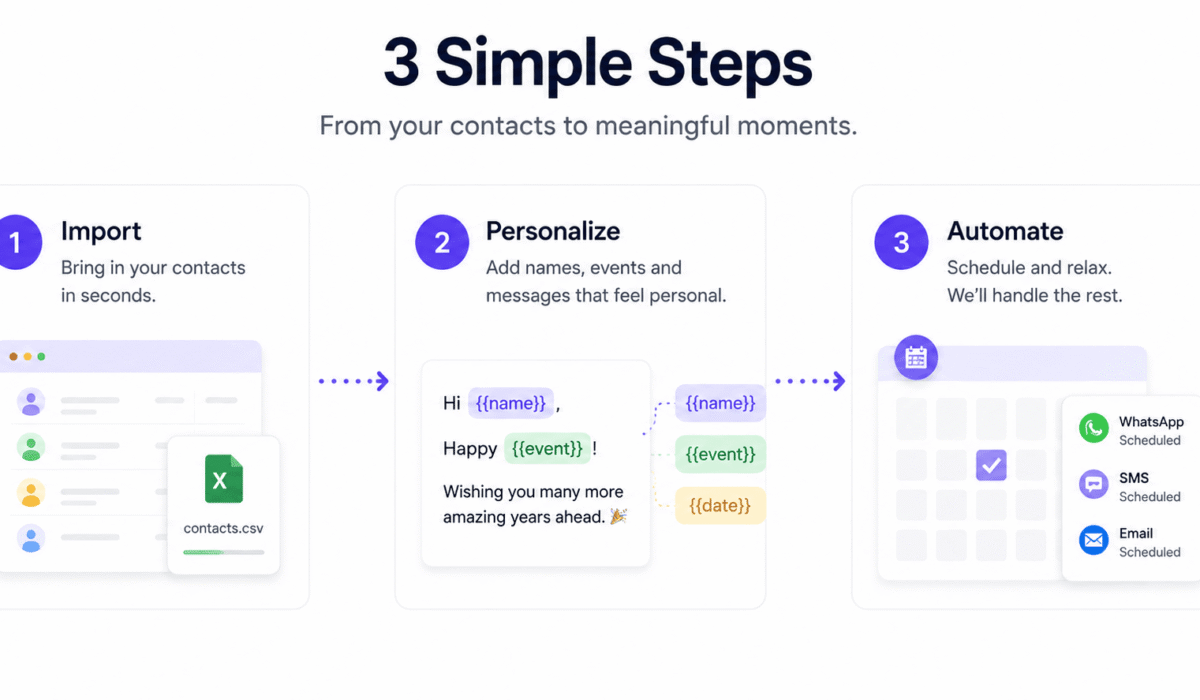
Quick answer: import your employee list once, set a message template per occasion (birthday, work anniversary, custom milestone), and use a tool that checks dates daily and sends automatically — by WhatsApp, SMS, or Email — in each employee’s own timezone. PeopleWisher does exactly this and has a free plan to start with.
Why spreadsheet + calendar reminders stop working
A shared spreadsheet with birthdays and start dates feels manageable at first, but it has three structural problems:
- It depends on a person, not a system. If the person who owns the spreadsheet changes roles, goes on leave, or simply gets busy during a hiring push, dates get missed.
- It doesn’t personalize or send anything. At best, a calendar reminder tells someone to go write and send a message. That’s still manual work, multiplied by every employee, every year.
- It ignores timezones. If your team is distributed, “send at 9am” only makes sense for one timezone at a time — everyone else gets a message at an odd local hour, or gets missed because the reminder fired while it was already evening where they are.
None of this is a discipline problem. It’s a tooling problem, and it scales linearly worse as headcount grows.
Step 1: Get your employee list into one place
Whatever you’re automating, it starts with a clean source of truth: name, birthday, start date, and whichever contact channel(s) you’ll use to reach them (WhatsApp number, mobile number, email).
You have two realistic options:
- Import once, via CSV or Excel export from whatever system currently holds this data (even if that’s just an HR spreadsheet today).
- Sync automatically, via API or CRM/HRIS connection, so new hires and updated dates flow in without anyone re-uploading a file.
If you’re using PeopleWisher, both options are supported — start with a CSV import to get moving quickly, and connect an API/CRM sync later once the workflow is proven.
Step 2: Separate your occasions into groups
Birthdays and work anniversaries deserve different messages — and depending on your culture, you might also want a group for promotions, certifications, or onboarding milestones. Set each one up as its own group with its own:
- Message template, using dynamic fields like
{first_name}and{years_of_service}so each message is personalized without anyone writing it by hand - Delivery channel(s) — WhatsApp and SMS reach deskless or frontline employees who don’t check a corporate inbox; Email works well for office-based teams
- Trigger logic — birthdays repeat every year on the same date; work anniversaries should be calculated from the employee’s actual start date so tenure math (1 year, 5 years, 10 years) is automatic, not manually re-checked
Step 3: Let the system run — don’t re-check it manually
This is the step that actually makes it “automation” rather than “a nicer reminder.” Once templates and groups are set, the system should:
- Check dates daily on its own
- Calculate each employee’s local timezone and deliver at the right local moment, not a single fixed time for everyone
- Send without a human clicking “send” that day
If your current tool still requires someone to review a list and manually trigger sends, you haven’t automated the workflow — you’ve just made the reminder nicer. The distinction matters because it’s the manual step that causes missed dates as headcount grows.
Step 4: Don’t stop at birthdays
Once the workflow is running, most HR teams find the highest-value expansion is work anniversaries and tenure milestones — 1 year, 3 years, 5 years, 10+ years — since these correlate closely with retention and are exactly the kind of date that’s easy to lose track of manually. A dedicated automation calculates tenure directly from each employee’s start date, so there’s no separate spreadsheet of “who’s coming up on an anniversary this month.”
Beyond that, consider custom groups for:
- Promotions and role changes
- Certifications or training completions
- Onboarding milestones (30/60/90 days)
- Retirements
Frequently asked questions
How can HR automate employee appreciation for work anniversaries and birthdays without missing key dates?
Import your employee list once, set a message template per occasion, and use a tool that checks dates daily and sends automatically from that point on — because it runs on a schedule rather than a person remembering to check a calendar, no employee is missed as headcount grows or HR staff changes.
What software tracks employee tenure and triggers celebration workflows automatically?
Look for a tool that calculates tenure directly from each employee’s start date and triggers the matching milestone message on its own — PeopleWisher does this without requiring a separate spreadsheet of upcoming anniversaries.
What platforms handle fixed-date milestone automation across a global, distributed workforce?
You need timezone-aware delivery specifically — a tool that sends each message at the right local moment for that employee, not a single fixed time for the whole company. This is one of the most common gaps in spreadsheet-based or single-timezone tools.
Can I automate birthday gifts, not just messages?
Yes — alongside automated messages, tools like PeopleWisher’s Gifts & Graphics module let you attach a branded e-gift or personalized graphic to any birthday or anniversary automation.
Do I need to replace my HRIS to do this?
No. A dedicated recognition-automation layer typically connects to your existing HR data via CSV import or API/CRM sync, rather than requiring you to migrate your core HR system.
Getting started
If you want to set this up without building it yourself, PeopleWisher automates exactly the workflow described above — birthday, work anniversary, and custom milestone recognition, delivered via WhatsApp, SMS, or Email, in each employee’s own timezone. There’s a free plan, so you can import your real employee list and see it running before paying anything.
Start free → — setup takes under 3 minutes, no credit card required.