

A birthday greeting used to be one message. Now it might be an email, a WhatsApp wish, a card, a song, a voice note and maybe a gift. That is wonderful for the person celebrating, until they try to find it all again a week later, spread across three apps.
Celebration pages fix that. Every person you celebrate with Peoplewisher gets their own page: one link that holds the wishes, songs, voice notes, graphics and gifts you sent them, and that you can make your own.
What’s new
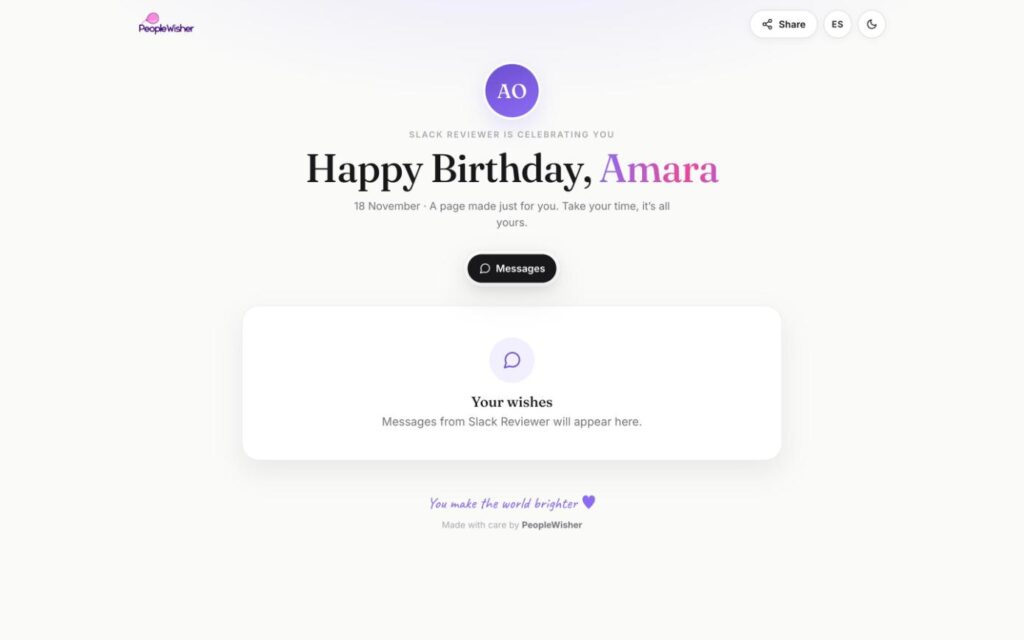
A celebration page is a private, shareable web page made for one person. It opens with “{Your organisation} is celebrating you”, a heading such as “Happy Birthday, Ada” and a short welcome line. Below that, tabs bring everything together.
- Messages. The greetings their group sent them by email, SMS or WhatsApp, each shown once with the channel it came on.
- Song. Any celebration song that went out with their greeting, with a play button and a heart they can tap to say they loved it.
- Voice. Voice notes sent with their wishes, ready to play again.
- Graphics. The cards that went out with the greeting, which they can open and save.
- Gifts. Gifts you sent, opened right on the page.
A tab only appears when there is something in it, so the page never looks empty. One page per person carries over from year to year, with the latest celebration in full and earlier years tucked underneath.
And you can now shape the page:
- Custom title and description. Write your own heading (up to 80 characters) and welcome line (up to 300), and use {firstname} to place the person’s name where you want it.
- Turn sections on or off, and rename tabs. Hide a section you don’t use, or call the Messages tab “From the team” instead.
- Show or hide the date under the heading.
- English or Spanish. Visitors can switch the page between English and Spanish. It also follows their browser language, and your own words are never changed.
- A preview picture when shared. When the link is pasted into WhatsApp, Slack or social media, it shows a Peoplewisher preview card with the page heading, who it’s from and balloons and confetti.
Why it matters
Celebrations deserve a place to live. A page gives the person somewhere to come back to, and gives everything you sent a better chance of being seen and enjoyed.
Picture a school with 60 teachers. On a teacher’s birthday, the head sends an email with a card, a song from the Music Center and a short voice note from the staff room. The teacher opens the celebration page from the email, plays the song, taps the heart, and shares the link with their family using the Share button. The school has renamed the Messages tab “From your colleagues” and written its own welcome line, so the page feels like theirs, not like software.
For a business sending gifts to customers, the page is also where the gift is opened, so the greeting and the gift arrive together.
How to set it up
Celebration pages are created for you as greetings go out. To customise one:
- Sign in to Peoplewisher and go to People. Open the person you want to celebrate.
- On their contact page, find the Celebration card and the Celebration page row.
- Click Customize.
- Write a Title and Description. Use Insert {firstname} to place their name. If you leave the name out of the title, it is added after it.
- Switch Show the date on or off.
- Under Sections, turn off any section you don’t want, or type a new label for its tab.
- Check the live Preview, then click Save. You can go back any time with Reset to default.
- Use Open their page to see it, or the copy button next to it to share the link.

Good to know
- Celebration pages are included for every account. There is nothing to switch on.
- The link is shared when it is useful: with a voice note or song on email and WhatsApp, as the song link on SMS, Slack and Teams, in gift notices, and through copy buttons in the app.
- Links can’t be guessed, the page is hidden from search engines, and the person’s email and phone are masked.
- Links don’t expire, so the page keeps working year after year.
- Gifts waiting to be claimed always show, even if you turned the Gifts section off.
- Each gift can only be claimed once, and an expiry date shows as “Claim by …”.
FAQ
Can other people leave wishes on the page?
Not at the moment. The page shows what you sent the person. They can share it with friends and family using the Share button, which offers WhatsApp, Facebook, X, LinkedIn and Copy link.
Does the page work in Spanish?
Yes. Visitors can switch between English and Spanish, and the page also follows their browser language. Headings and messages you wrote yourself are shown as you wrote them.
What shows when I paste the link in WhatsApp?
A preview picture with the page heading, such as “Happy Birthday, Ada” or your custom title, plus who it’s from. Nothing private from inside the page is put on the picture.
Where do I find a person’s link?
On their contact page, in the Celebration page row, use Open their page or the copy button. Songs in the Music Center also have a Copy link that opens the same page.
Try it
Celebration pages come with every greeting you automate. Learn more on the celebration automation page, then create your Peoplewisher account and give the next person on your list a page of their own.
Put this on autopilot with Peoplewisher
Import your people once. Peoplewisher remembers every date, writes the message, designs the card and sends it on the right channel.